

Setting Up Agentic Framework with Google ADK
Are you also looking to build your cool agentic app? Look no further! This guide will walk you through the steps to set up the Agentic Framework using the Google Agent Development Kit (ADK).
Watch Youtube Video Here For Deeper Understanding
I will create a minimal example to get you started quickly. We will cover -
- Creating an Agent
- Writing instructions for the Agent
- Running the Agent
- Adding Agent Pre and Post Hooks
And what's the great thing? We're going to do this for both Google ADK and AWS AgentCore Runtime with Strands! So that you can understand the differences and similarities between the two platforms and choose the one that fits you!
Let's get started!
Prerequisites
- uv package manager (You can install it here)
- Python 3.13+ (Other versions may work but would recommend to be on Python 3.13+)
- Google Gemini API Key (You can get it from here)
Setting Up Google ADK
We will start with adk. In the project directory create a folder named adk_agents. Your root should look like this:
.
├── README.md
└── adk_agents

2 directories, 1 file
Please note that README.md is not a necessary file for the setup; it's just included here for clarity.
Run the command from the root (where adk_agents folder is located):
uv init
uv add google-adk # Assuming you have uv package manager installed
Once done you should see things like this:
.
├── README.md
├── adk_agents
├── main.py
├── pyproject.toml
└── uv.lock

2 directories, 4 files
Now let's create our first agent (news_agent) using the adk create command as shown below:
uv run adk create ./adk_agents/news_agent
It will prompt you for some questions. Feel free to choose as per your requirements. Below is how I chose:
➜  agents_demo git:(main) ✗ uv run adk create ./adk_agents/news_agent

/home/shivamsahil/projects/2025/nov/agents_demo/.venv/lib/python3.13/site-packages/google/cloud/aiplatform/models.py:52: FutureWarning: Support for google-cloud-storage < 3.0.0 will be removed in a future version of google-cloud-aiplatform. Please upgrade to google-cloud-storage >= 3.0.0.
  from google.cloud.aiplatform.utils import gcs_utils
Choose a model for the root agent:
1. gemini-2.5-flash
2. Other models (fill later)
Choose model (1, 2): 1
1. Google AI
2. Vertex AI
Choose a backend (1, 2): 1

Don't have API Key? Create one in AI Studio: https://aistudio.google.com/apikey

Enter Google API key: XXXXXXXXXXXXXXXXXXXXXXXXXXXX

Agent created in /home/shivamsahil/projects/2025/nov/agents_demo/./adk_agents/news_agent:
- .env
- __init__.py
- agent.py

➜  agents_demo git:(main) ✗
Now since it has generated 3 files, we should be good to get started. One more very important thing is to keep your .env file secret. So make sure to add it to your .gitignore file as shown below:
**/.env
Make sure the above line is added to your .gitignore file to prevent accidental commits of sensitive information.
Now let's inspect what do we see inside the agent.py file:
from google.adk.agents.llm_agent import Agent

root_agent = Agent(
    model='gemini-2.5-flash',
    name='root_agent',
    description='A helpful assistant for user questions.',
    instruction='Answer user questions to the best of your knowledge',
)
Before doing any changes, let's run the agent to see if everything is working fine.
➜  agents_demo git:(main) ✗ uv run adk web ./adk_agents --reload
/home/shivamsahil/projects/2025/nov/agents_demo/.venv/lib/python3.13/site-packages/google/cloud/aiplatform/models.py:52: FutureWarning: Support for google-cloud-storage < 3.0.0 will be removed in a future version of google-cloud-aiplatform. Please upgrade to google-cloud-storage >= 3.0.0.
  from google.cloud.aiplatform.utils import gcs_utils
/home/shivamsahil/projects/2025/nov/agents_demo/.venv/lib/python3.13/site-packages/google/adk/cli/fast_api.py:130: UserWarning: [EXPERIMENTAL] InMemoryCredentialService: This feature is experimental and may change or be removed in future versions without notice. It may introduce breaking changes at any time.
  credential_service = InMemoryCredentialService()
/home/shivamsahil/projects/2025/nov/agents_demo/.venv/lib/python3.13/site-packages/google/adk/auth/credential_service/in_memory_credential_service.py:33: UserWarning: [EXPERIMENTAL] BaseCredentialService: This feature is experimental and may change or be removed in future versions without notice. It may introduce breaking changes at any time.
  super().__init__()
INFO:     Started server process [55700]
INFO:     Waiting for application startup.

+-----------------------------------------------------------------------------+
| ADK Web Server started                                                      |
|                                                                             |
| For local testing, access at http://127.0.0.1:8000.                         |
+-----------------------------------------------------------------------------+

INFO:     Application startup complete.
INFO:     Uvicorn running on http://127.0.0.1:8000 (Press CTRL+C to quit)
Once you see this - goto http://localhost:3000 and try to interact with the agent:

If you see responses from the agent, congrats! You have successfully set up your first agent using Google ADK.
Now lets learn some more concepts of adk.
›Core Concepts of Agentic Framework
For any agentic framework, these are some key components -
- Agent: The main entity that performs tasks.
- Instructions: Guidelines provided to the agent to perform its tasks.
- Hooks: Functions that run before or after certain actions to modify behavior.
- Tools: External utilities that the agent can use to enhance its capabilities.
- Memory: The agent's ability to remember past interactions or data.
So far we have seen our very basic agent in action. Now let's enhance it by adding some instructions and hooks.
Adding Instructions
Let's say we want our agent to refrain from answering questions related to politics. We can update the instruction parameter in the agent.py file as shown below from:
instruction='Answer user questions to the best of your knowledge'
to:
instruction=('Answer user questions to the best of your knowledge. '
    'Refrain from tapping into political topics.'
    'If asked about political topics, respond with "I am not able to answer that question."')
Since we are running the server in reload mode, the changes will be reflected automatically. Go ahead and try asking a political question to the agent. Make sure to reload the web app though as sessions are in memory and vanish on reload.
Similary you can add more detailed instructions to the agent as per your requirements. We will see some examples in the video explanations.
Adding Pre and Post Hooks/Callbacks
You may want to guardrails around your agent to modify its behavior before or after certain actions. You may also want to attach specific context to the agent before it processes a user query. This is where hooks/callbacks come into play.
In ADK, we call it callbacks:
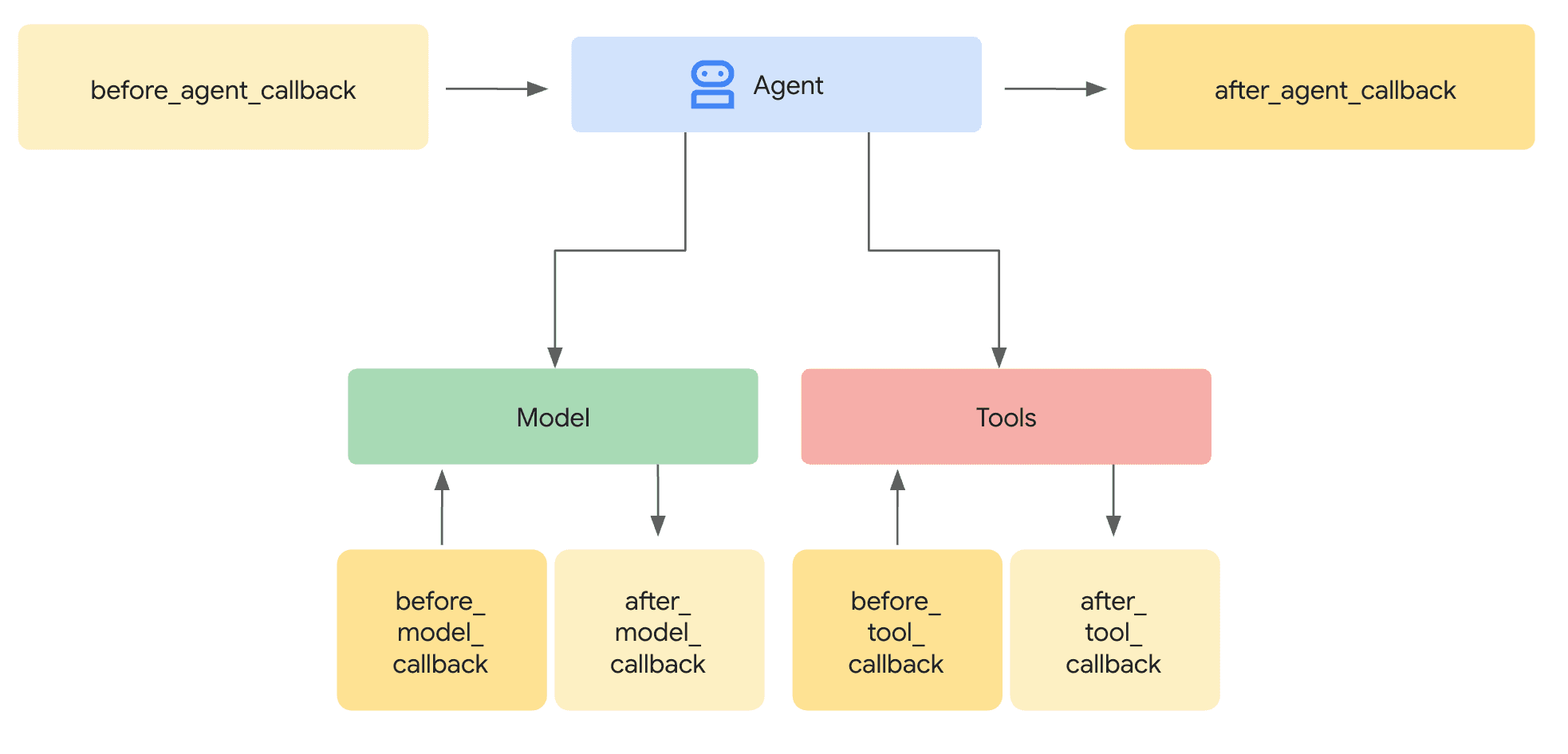
Image Credits - Google ADK Documentation
In Strands (As we will see next), they are called hooks.
Let's say we have a joke telling agent - which can entertain users with different jokes. But we may not want to run into some sensitive topics. This is a case where callbacks can rescue. We will understand this example with before_model_callback however it can be used to modify state variable, add additional context and a lot of other things.
Let's say I have a simple joke telling agent:
root_agent = Agent(
    model='gemini-2.5-flash',
    name='root_agent',
    description='Joke assistant that tells jokes based on user prompts.',
    instruction='Tell a joke based on the user prompt.',
)
Now I need to block a specific topic. Let's say death. So I would add a callback like this:
# --- Define the Callback Function ---
def simple_before_model_modifier(
    callback_context: CallbackContext, llm_request: LlmRequest
) -> Optional[LlmResponse]:
    """Inspects/modifies the LLM request or skips the call."""
    agent_name = callback_context.agent_name
    print(f"[Callback] Before model call for agent: {agent_name}")

    # Inspect the last user message in the request contents
    last_user_message = ""
    if llm_request.contents and llm_request.contents[-1].role == 'user':
         if llm_request.contents[-1].parts:
            last_user_message = llm_request.contents[-1].parts[0].text
    print(f"[Callback] Inspecting last user message: '{last_user_message}'")

    # --- Modification Example ---
    # Add a prefix to the system instruction
    original_instruction = llm_request.config.system_instruction or types.Content(role="system", parts=[]) # pyright: ignore[reportUnknownVariableType, reportUnknownMemberType]
    prefix = "[Modified by Callback] "
    # Ensure system_instruction is Content and parts list exists
    if not isinstance(original_instruction, types.Content):
         # Handle case where it might be a string (though config expects Content)
         original_instruction = types.Content(role="system", parts=[types.Part(text=str(original_instruction))]) # pyright: ignore[reportUnknownArgumentType]
    if not original_instruction.parts:
        original_instruction.parts.append(types.Part(text="")) # pyright: ignore[reportOptionalMemberAccess] # Add an empty part if none exist

    # Modify the text of the first part
    modified_text = prefix + (original_instruction.parts[0].text or "") # pyright: ignore[reportUnknownVariableType, reportOptionalSubscript, reportUnknownMemberType]
    original_instruction.parts[0].text = modified_text # pyright: ignore[reportOptionalSubscript]
    llm_request.config.system_instruction = original_instruction
    print(f"[Callback] Modified system instruction to: '{modified_text}'")

    # --- Skip Example ---
    # Check if the last user message contains "prohibited_keyword"
    if prohibited_keyword in last_user_message.upper(): # pyright: ignore[reportOptionalMemberAccess]
        print(f"[Callback] '{prohibited_keyword}' keyword found. Skipping LLM call.")
        # Return an LlmResponse to skip the actual LLM call
        return LlmResponse(
            content=types.Content(
                role="model",
                parts=[types.Part(text="LLM call was blocked due to prohibited keyword.")],
            )
        )
    else:
        print("[Callback] Proceeding with LLM call.")
        # Return None to allow the (modified) request to go to the LLM
        return None
Now supply this to agent:
root_agent = Agent(
    model='gemini-2.5-flash',
    name='root_agent',
    description='Joke assistant that tells jokes based on user prompts.',
    instruction='Tell a joke based on the user prompt.',
    before_model_callback=simple_before_model_modifier
)
That's it! Now every time we trigger the joke agent with a prompt and ask making a joke about death - it will block that call. Ofcourse you can use synonyms or other related term but this is more about how and when can we use these tools - you get it right?
Tools
Now we have covered - agents and runtime, instructions and hooks. Now let's understand the tools. Unlike LLMs, agents are empowered with tools to perform jobs on behalf of humans. LLM is like the brain of the agentic architecture, tools can be organs. Brain would instruct to perform certain actions and delegate the tasks and then tools would be invoked to do so.
Let's go back to news_agent. Now news agent should be capable enough of finding the right details of news requested by user and provide it back. For this we can use multiple tools, for example - google_search. This is one of the inbuilt tools of ADK and is pretty cool to fetch right information on the fly.
However we will also see examples on how we can use our own created tool. This is how our current news_agent looks like:
from google.adk.agents.llm_agent import Agent

root_agent = Agent(
    model='gemini-2.5-flash',
    name='root_agent',
    description='A helpful assistant for user questions.',
    instruction='Answer user questions to the best of your knowledge',
)
Now let's provide it with 2 tools:
- Google Search
- Personal User Info
Adding google search tool (which is natively supported by adk) is pretty simple:
from google.adk.agents.llm_agent import Agent
from google.adk.tools import google_search

root_agent = Agent(
    model='gemini-2.5-flash',
    name='root_agent',
    description='A helpful assistant for user questions.',
    instruction=("You are a news agent."
                 "You need to provide user with top headlines of the day"
                 "If user has any specific question, you can answer those as well"
                 "Try to keep your responses short, crisp, clear and to the point."),
    tools=[google_search]
)
As you can see I have used adk inbuilt tools along with the updated instructions. Now let's test our agent and try asking it more about news.
Adding your Custom tool
An important limitation of adk is that at the moment you can't combine adk tools with custom tools. So either all your tools are supposed to be custom or adk based as per this thread.
But here's a workaround, and this workaround would help us explore multi agent architecture too, so let's have a look at it:
from google.adk.agents import Agent
from google.adk.tools import google_search, AgentTool
from typing import Any

def personal_info(args: dict[str, Any]) -> dict[str, Any]:
    """
    Retrieves:
        Personal User Information given by user_id.
        Expects a dictionary containing:
                {
                    "user_id":str
                }
    Returns:
        A dictionary containing user information like this:
        {
            "name":str,
            "age": int,
            "location": str,
            "error": Optional[str]
        }
    """

    user_id = args.get("user_id", None)
    if user_id is None:
        return {
            "error": "Unknown user id - None"
        }
    # We can do database call or queries or anything that we want here
    return {
        "name": "Sam",
        "age": 26,
        "location": "Delhi"
    }

# Step 1: Create a specialized agent for personal information
personal_info_agent = Agent(
    model='gemini-2.5-flash',
    name='personal_info_agent',
    description='Retrieves personal user information by user_id.',
    instruction='You retrieve personal user information. When called, use the personal_info function to get user details.',
    tools=[personal_info]
)

# Step 2: Create a specialized agent for search
search_agent = Agent(
    model='gemini-2.5-flash',
    name='search_agent',
    description='Performs Google searches to find current news and information.',
    instruction='You are a search specialist. Use Google Search to find current information, news headlines, and answer questions that require up-to-date information.',
    tools=[google_search]
)

# Step 3: Create the root orchestrator agent with AgentTools
root_agent = Agent(
    model='gemini-2.5-flash',
    name='root_agent',
    description='A helpful assistant for user questions.',
    instruction=(
        "You are a helpful news and information agent. "
        "You can help users with two main tasks:\n"
        "1. Retrieve personal user information using the personal_info_agent\n"
        "2. Search for current news, headlines, and answer questions using the search_agent\n\n"
        "Based on user input, determine which specialist agent to use:\n"
        "- Use personal_info_agent when users ask about their personal information\n"
        "- Use search_agent when users ask about news, current events, or need information from the web\n\n"
        "Keep your responses short, crisp, clear and to the point."
    ),
    tools=[
        AgentTool(agent=personal_info_agent),
        AgentTool(agent=search_agent)
    ]
)
Please note that docstring of the function is a very important information, agent uses to understand about its tool's capabilities - so always make sure to provide it appropriately.
And you can also see how we can go in multi agent tooling system using AgentTool.
›Memory
We have two types of memory -
- short term
- long term
Short Term Memory (State variable)
In a given session you are always exposed with a state variable which you have full control of in updating and manipulating it based on your needs.
Just to keep things short - treat short term memory as a state dictionary which could be accessed and populated at any point of time in agent processing lifecycle.
Long Term Memory (MemoryService)
This can be covered via multiple ways -
- using GCP rag corpus
- Vertex AI Memory Bank
It provides functions like add_session_to_memory and search_memory.
We can load memory which could be useful for cross session services, for example:
In session 1, user asks:
"I am planning to work on XYZ project for next six weeks. The tech stack of XYZ project can have fast API and ADK." Agent stores this in long term memory
In session 2, user asks:
"Which projects do we need to work on this week?" Agent replies - "XYZ Project"
InMemory service is about keyword search match only, however Vertex AI memory bank can be used for semantic based (contextually same) search as well.
The service handles two key operations:
- Generating Memories: At the end of a conversation, you can send the session's events to the Memory Bank, which intelligently processes and stores the information as "memories."
- Retrieving Memories: Your agent code can issue a search query against the Memory Bank to retrieve relevant memories from past conversations.
And that's a wrap! I hope now you're more comfortable with agentic framework and the overall architecture. Don't forget to check out the video demonstration to understand things in even more detail. Do let me know in comments if you would be interested in understanding another agentic framework - Strands to contrast between the two and pick the best for your next agentic application.